

A booking engine is the checkout of your own website. It shows which nights are open, quotes the full price, takes the card and confirms the stay. This guide is for vacation rental owners and managers who want more guests to book on their own site and need to choose the software that makes that possible.
You will see the three ways to add an engine to a site, the published prices and direct-booking fees of the main engines as of October 2026, what each direct stay costs after card fees and damage protection, and how to switch engines without losing a reservation. Three tools help you decide: a cost calculator, a fit scorecard and a launch checklist.
What a Booking Engine Does
A booking engine does five jobs, in the same order, every time a guest books. If one of them fails, the booking fails with it.
- Quote. The guest picks dates and a party size. The engine adds the nightly rates, the cleaning fee, any pet or extra-guest fee and the taxes, and shows the total.
- Availability. It reads the calendar your PMS keeps in step with Airbnb, Vrbo and Booking.com, so only open nights can be picked, and it applies your minimum stay and check-in day rules.
- Checkout. It asks for names, a phone number and an email, shows the house rules and cancellation policy, and asks the guest to accept your rental agreement.
- Payment. It charges the card through a processor such as Stripe on the schedule you set: the full amount now, or a deposit now and the balance later.
- Confirmation. It closes the dates on every channel, sends the guest a confirmation and starts your arrival messages.
Vendors use four labels loosely: booking engine, website builder, PMS and channel manager. They overlap, but each does a different job, and knowing which is which tells you what you are paying for.
| Tool | What it does | What it cannot do on its own | Examples |
|---|---|---|---|
| Booking engine | Quotes, takes payment and confirms direct stays | Keep Airbnb and Vrbo calendars in step without a PMS or channel manager | The engines inside Lodgify, Hostaway, Guesty and OwnerRez |
| Website builder | Pages, photos, text and your domain | Sell nightly stays with live rates and open dates | Wix, Squarespace, WordPress |
| PMS (property management system) | Calendar, reservations, guest messages, payments and reports | Bring guests to you; it needs channels and a site | Hostfully, Hospitable, Uplisting |
| Channel manager | Sends rates and open dates to Airbnb, Vrbo and Booking.com and pulls their bookings back | Sell a stay on your own site | Usually part of the PMS; Beds24 and Smoobu sell both |
In practice most owners buy all four in one subscription. Hostaway's direct booking page lists connections to "Airbnb, Vrbo, Booking.com, Google, and more" next to its booking website, and Guesty's Pro plan lists "70+ booking channels" next to its booking engine (Hostaway). That is why searches for direct booking software, a direct booking platform and a booking engine for vacation rentals all lead to the same short list of PMS vendors.
Where the Calendar Lives
The question that matters most is which system holds the master calendar. If your PMS holds it, your engine should be the PMS's own engine or a site that reads the PMS live through its API. An engine that keeps its own calendar and swaps dates with Airbnb by iCal link updates on a timer, so a night sold on Airbnb can stay open on your site for a while. For one home with few bookings that gap is small. For a busy portfolio, it is where double bookings come from.
If you are still choosing the PMS itself, start with our comparison of PMS software for short-term rentals. This page covers the engine: what it costs, how it takes payment and how it fits your site.
For the whole setup next to Airbnb, from accounts to policies, see our guide to building a direct booking system alongside Airbnb.
Three Ways to Put One on Your Website
You can put a booking engine in front of guests in three ways. They differ in who owns the pages, how much control you have over design and search, and what you pay before the first booking arrives.
The PMS's Hosted Site
Most PMS vendors will build a site from your listing data: photos, descriptions, amenities, rates and the live calendar. Hostaway says its basic Booking Website "is included at no extra cost with your Hostaway subscription," and its Booking Website Pro, with a full editor, SEO tools and a blog, is a $49 a month add-on plus "a 0.5% reservation fee on bookings generated through Booking Website Pro" (Hostaway).
OwnerRez and Uplisting sell or include hosted sites too, with prices in the next chapter. This route fits an owner with one to a few homes who wants to take direct bookings this month. The trade-offs are template layouts, a fixed page structure and little room for the pages that win search traffic. The site also lives on the vendor's platform, so a PMS switch means a new site.
A Widget or Plugin Inside Your Own Site
If you already have a site on WordPress, Wix or Squarespace, you can add the engine to it: a search box on the home page, a calendar and Book button on each property page, or a link that opens the vendor's checkout. OwnerRez sells a WordPress plugin and integrated-site feature from $10 a month for the first property and says every account includes unlimited widgets (OwnerRez). Lodgify's website builder and booking widget start on its Starter plan.
This fits an owner whose current site already ranks in search or carries a brand they like. You keep two systems current, the widget's look is only partly yours, and checkout often happens on the vendor's page. Our guide to short-term rental website builders compares the builders themselves.
A Custom Site on the PMS's API
The third route is a site designed for your brand that reads homes, rates and open dates from your PMS through its API, then hands the guest to the PMS checkout or takes payment on your own domain. Uplisting lists "Full REST API access" on all plans, Smoobu lists full API access on its Prepaid and Teams plans, and OwnerRez says self-use of its API through an OAuth app needs no premium feature. Specialist builders such as CraftedStays and Boostly work this way; their published terms are in the next chapter.
This fits brands with several homes or high nightly rates, where pages that rank and convert pay back the build. It costs more up front, someone has to maintain it, and you depend on the PMS keeping its API open.
Fits one to five homes, a tight budget and a launch this month. In the examples in this guide it is included or costs $10 to $49 a month.
- Live in days from your listing data
- Template design and page structure
- A new site if you change PMS
Fits a brand with several homes or high nightly rates, where search and design drive bookings.
- Your own design, pages and addresses
- Can move to a new PMS that has an API
- Higher upfront cost and ongoing upkeep
The Main Booking Engines Compared
Here are the published facts for the main engines, taken from each vendor's own pages in October 2026. Most prices scale with property count and change often, so treat each row as the start of a quote and get every per-booking fee in writing. Prices in pounds and euros are the vendors' own; we did not convert them.
| Engine | How you get the site | Published price, October 2026 | Fee on direct bookings | Payments | Google Vacation Rentals |
|---|---|---|---|---|---|
| Lodgify | Website builder and booking widget from Starter | Starter $26 to $33 a month; Professional $47 to $58 | No booking fee; 1% on online guest payments | Stripe or PayPal | Professional and up |
| Hostaway | Booking Website included; Pro add-on $49 a month | Custom plans; no prices published | Processing fee per reservation (amount not stated); Pro adds 0.5%; 1.8% to U.S. guests | Not named on the page | Google listed among its channels |
| Guesty | Booking engine; Advanced Websites on Pro and Enterprise | Lite from $9 per listing a month (1 to 3 listings); Pro by quote | None, per its pricing FAQ | GuestyPay on Pro and Enterprise | Listed on Pro |
| OwnerRez | Hosted Websites, WordPress plugin, widgets | $40 a month minimum; hosted site $15 for the first home | None, per its pricing page | Stripe, PayPal and others | Direct API channel |
| Hostfully | Direct booking site on all plans | Growth from $15, Pro from $25 per property a month, plus a platform fee | Growth 0.85% plus a 1% gateway fee; Pro none | Not stated in text | Not stated |
| Hospitable | Direct site on Professional and Mogul | Professional $59 a month with 2 homes; Mogul $99 with 3 | Basic 1%; Premium 4% plus 3% processing | Stripe | Not stated |
| Uplisting | Basic site on all plans; Plus site £30 a month | Independent Host £40 a month or 3% per booking; Operator £90 or 1.5% | No separate direct fee stated | Not stated | Operator and Manager |
| Smoobu | Website builder and booking system | Professional Flex €29 a month; Prepaid €35 | Flex 0.9%; other plans none | Stripe and PayPal | Not on its pricing page |
| Beds24 | Booking engine and website included | From €15.50 a month plus €0.55 per channel link | None | Not stated | Not stated |
| Zeevou | Direct booking website on the free plan | Forever Free plan £0 | 0% direct booking fee | Not stated | Free for verified hosts |
| iGMS | Bookable Website on PRO | FLEX $1 per booked night ($20 minimum); PRO $38 to $48 per property | FLEX 0%; free plan 4% on direct payments | Stripe | Says it is an official partner |
| Tokeet | Webready site builder | $134.90 a month for up to 10 rentals | None, per its pricing page | Not stated | Not stated |
| Bookerville | Booking widgets | $66.55 a month for one property | Not stated | Not stated | Not stated |
"Fee on direct bookings" means the engine's own charge. Card processing comes on top in every row unless the vendor says it is included. Lodgify's prices are the figures its page shows by default, and its FAQ says pricing "varies based on the number of properties."
Lodgify
Lodgify lists four plans: Basic at $18 a month for one property, Starter at $33 for up to two, Professional at $58 and Ultimate at $85, with lower figures ($14, $26, $47 and $68) marked "Save 20%" for longer billing. The website builder and booking widget start on Starter, and Professional adds "Listing your website on Google Vacation Rentals." Its FAQ says "Lodgify has no booking fee on any plan and takes no cut of your bookings," while "a transaction fee of 1% applies to payments your guests make online through a payment gateway such as Stripe or PayPal," and the gateway charges its own fee as well (Lodgify). It fits owners of a few homes who want the site and the engine in one subscription.
Hostaway
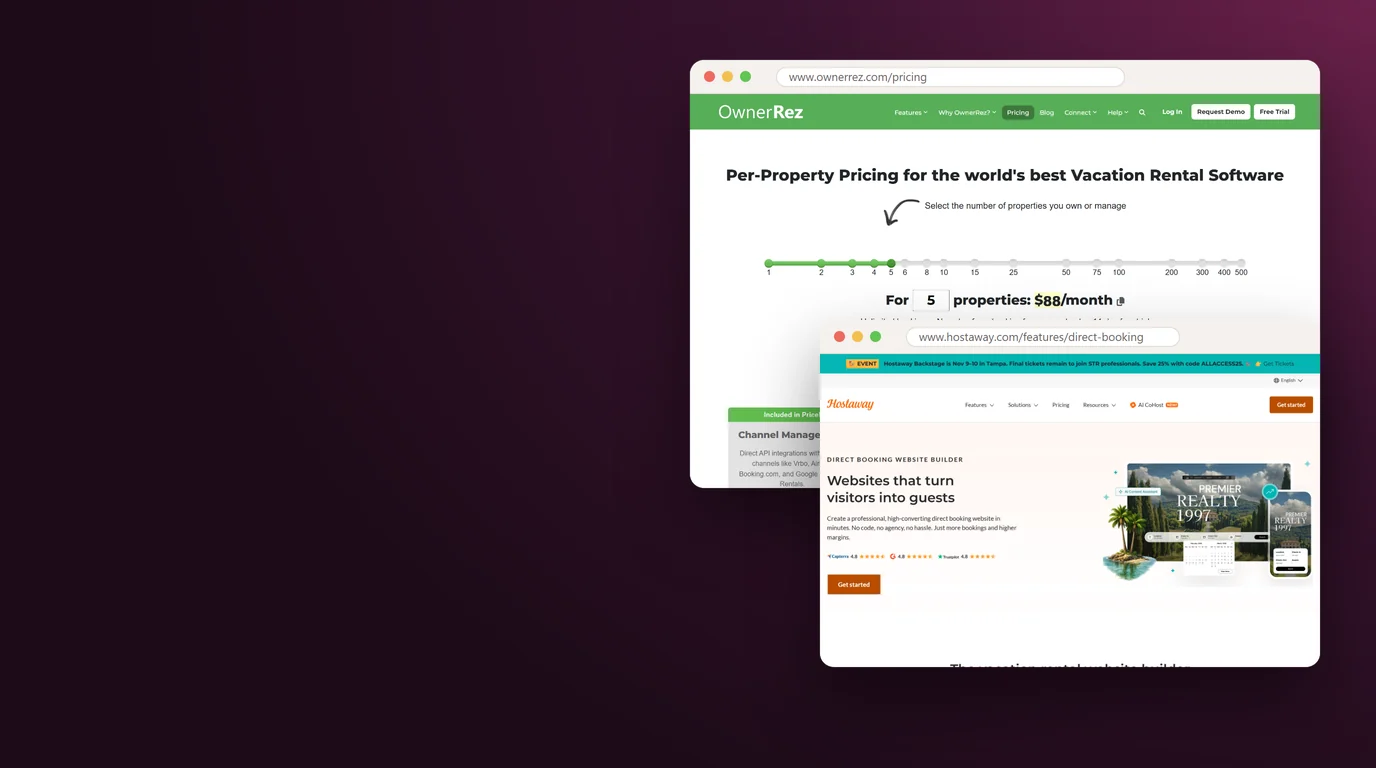
Hostaway's pricing page shows no prices; it asks how many listings you manage and offers custom plans (Hostaway pricing). Its direct booking page says users get the website builder "free of charge" and pay a processing fee for each direct reservation, without naming the amount, and that Hostaway "marks up and charges a 1.8% fee directly to guests (US only)." If you use it, check that the first total a U.S. guest sees includes that fee, as the FTC rule in chapter seven expects. It fits managers who already run Hostaway and want the site from the same system.
Guesty
Guesty Lite, for one to three listings, "starts at $9 per listing per month, with a 14-day free trial." Pro (4 to 199 listings) and Enterprise are quoted. The pricing FAQ says Guesty "doesn't charge percentage-based fees on reservations or cancellations made through its direct booking engine." Advanced Websites and the GuestyPay payments add-on are "Available for Guesty Pro and Enterprise," and Pro's channel list includes Google Vacation Rentals (Guesty). It fits managers who expect to grow into Pro.
OwnerRez
OwnerRez has a $40 monthly minimum, then a falling fee for each extra property. Hosted Websites add $15 a month for the first property and $5 for the second. Its pricing page says "No commissions, no guest fees, or per-booking fees," includes signed rental agreements, and lists Google Vacation Rentals among its direct API channels (OwnerRez). It fits owners who want detailed control, or a widget for a site they already have.
Hostfully and Hospitable
Hostfully includes a direct booking site on every plan. Growth starts at $15 per property a month and Pro at $25, each "+ platform fee." Growth adds a "0.85% direct booking fee" and a "1% payment gateway fee"; Pro lists "No commissions on direct bookings" and "No payment gateway fee" (Hostfully).
Hospitable puts direct booking on Professional ($59 a month including two properties) and Mogul ($99 including three), with a monthly fee for each extra property; its Host and Essentials plans do not include it. Direct Basic carries a 1% commission. Direct Premium carries a "4% commission + 3% processing fee," and Hospitable's help center says guests pay the 4% service fee by default (Hospitable). Premium also adds damage protection and guest vetting for direct stays.
Uplisting, Smoobu, Beds24 and Zeevou
Uplisting prices in pounds: Independent Host is £40 a month, or £0 plus 3% per booking, and Operator is £90 a month or 1.5% per booking. A basic site comes with every plan, a Plus site adds £30 a month below the Manager plan, and Google Vacation Rentals comes with Operator and Manager (Uplisting).
Smoobu bills in euros. Professional Flex is €29 a month with a "0.9% booking fee," and the page says "All our other plans are commission-free." Its booking system includes Stripe and PayPal, and every plan can use your own domain (Smoobu).
Beds24 includes its booking engine and booking website at no extra cost on a base fee from €15.50 a month plus €0.55 per channel link, and says it "never charges commissions on bookings" (Beds24).
Zeevou's Forever Free plan includes a direct booking website with a "0% Direct Booking Fee"; the company earns from "a network fee for cross-host bookings" instead, and says its Google Vacation Rentals connection is "completely free for verified hosts" (Zeevou).
iGMS, Tokeet and Bookerville
iGMS calls itself "an official Google Vacation Rentals partner." FLEX costs $1 per booked night with a $20 monthly minimum per property and a 0% booking fee; PRO, which lists a Bookable Website, is $38 per property a month on annual billing or $48 monthly. The free plan charges a "4% fee only on direct payments" (iGMS).
Tokeet lists one plan at $134.90 a month for up to 10 rentals, with its Webready site builder and "No booking or usage fees" (Tokeet). Bookerville prices by property count, from $66.55 a month for one property, and offers booking widgets for your own site.
Website Specialists on Top of a PMS
Some companies sell the site and leave the engine to your PMS. CraftedStays lists $89.99 a month as the standard price for two properties, $8 for each extra property and no booking commission; it syncs with Hostaway, Guesty, Hospitable, OwnerRez and Hostfully, and checkout runs through the PMS or through Stripe on your domain (CraftedStays).
Boostly says it builds custom WordPress sites connected to PMSs including Hostaway, Guesty, OwnerRez, Lodgify, Smoobu, Uplisting, Zeevou and Hospitable. Ask it for a written quote for your property count (Boostly).
For more vendors and what they connect to, see our directory of PMS platforms. Before any demo, send every vendor on your shortlist the same questions and compare the written answers.
Questions to send a booking engine vendor before the demo
Subject: Booking engine questions before our demo

Hi [Vendor contact name],

Before we book a demo, could you answer these in writing for [number] properties in [country]?

1. What is the full monthly price for our property count, on monthly and on annual billing?
2. Is there any fee on direct bookings, charged to us or to the guest? What percentage, and on which plans?
3. Which payment processors can we use, and what does each charge per card payment?
4. Can each property take instant bookings and booking requests, and can we take a deposit now and charge the balance on a set date?
5. Do you connect to Google Vacation Rentals, and what does Google require for an account like ours?
6. Is there an open API we can use for a custom website, and is it included or extra?
7. If we leave, can we export reservations, guest records and payment history, and can saved cards move to a new processor?

Thanks,
[Your name]
[Company name]
Payments, Deposits and Damage Protection
On Airbnb, the platform charges the guest and pays you out. On your own site you choose the card processor, the payment schedule, the deposit or protection plan and the rental agreement, and each choice has a price.
Card Fees
Most engines charge cards through Stripe or through their own payment product. Stripe's standard U.S. rate is 2.9% + 30 cents per successful domestic card charge, with 1.5% more for international cards, 1% more when currency conversion is needed, and $15 when a guest disputes a charge (Stripe). On a $2,000 stay paid with a U.S. card, the fee is $58.30. Engine fees sit on top, such as Lodgify's 1% on online payments or Hostfully Growth's 1% gateway fee, so add both when you compare.
What a card payment costs
Per successful charge on a domestic card.
Added to the domestic rate for cards issued abroad.
Charged when a guest disputes a payment.
Source: Stripe U.S. pricing, Oct 2026
Security Deposits or Damage Protection
A security deposit is money you hold or charge on the guest's card and release after checkout if nothing is damaged. A damage protection plan or waiver is a fee per booking, often passed to the guest, that pays for covered damage instead. A deposit costs little but leaves you to make the claim, and some guests balk at a large hold. Protection costs money on every stay but avoids the hold. Here is what the vendors publish.
| Product | What it is | Published price, October 2026 |
|---|---|---|
| OwnerRez Damage Protection | Cover per booking, Standard or Enhanced | Standard $13 ($500 cover) to $69 ($5,000); Enhanced $23 to $79 ($25,000 on Platinum) |
| Uplisting Protect | Automated security deposits, including direct and Google bookings | £4 per listing a month |
| Hospitable Direct Premium | Damage protection and guest vetting for direct stays | Inside Premium's fees; security deposits carry a 2% processing fee |
| Guesty Damage Protection | Protection add-on for stays without a deposit | On all plans; no price published |
| Hostfully Screen & Protect | Damage protection sold as an add-on | No price published |
| Truvi | Guest screening with optional damage protection | Priced per booking on its own site |
OwnerRez's Enhanced tiers also add $1,000,000 in host liability cover (OwnerRez costs and fees). Whichever you choose, the engine has to collect it: check that it can charge the protection fee or place the deposit hold on direct stays as well as on platform bookings.
Guest ID Checks
On your own site, no platform has checked who the guest is. Uplisting charges £1.25 per ID check through Stripe Identity, included on its Manager plan; Guesty sells GuestVerify screening on Pro and Enterprise; and Hospitable's Direct Premium includes guest vetting. For a large home, ask for ID before you send the door code.
Rental Agreements
The rental agreement is your contract with the guest: occupancy, quiet hours, pets, damage and cancellation. OwnerRez includes "Completely customizable legal agreements with signed PDFs generated for each guest," and Uplisting lists eSign rental agreements. Have a local lawyer review your agreement once, then set the engine to require a signature at checkout or before arrival.
A required damage waiver or protection fee is part of the price. Show it in the first quote for the guest's dates, as chapter seven explains, instead of adding it after the booking.
What a Booking Engine Costs per Booking and per Year
An engine has fixed costs, the monthly software and site, and per-booking costs: card fees, any engine fee and damage protection. Against them sits the platform fee that a direct stay does not pay. The calculator below puts both sides on one screen.
The platform side first. Airbnb's Help Center says most hosts on the host-only fee pay 15.5%. Under the split fee, which Airbnb is phasing out, most hosts pay 3% while guests pay 14.1% to 16.5% of the booking subtotal (Airbnb Help Center).
Airbnb's Resource Center, updated October 13, 2026, adds that hosts using property management software who were not yet on the single fee "switched to the single fee on October 13" (Airbnb Resource Center). If your PMS is connected to Airbnb, 15.5% is the rate most hosts pay.
Vrbo's help page describes "a flat, all-in 12% commission fee, which includes payment processing fees," with 12% to 15% in some regions such as Europe, Australia and New Zealand (Vrbo). Rental Scale-Up reported Vrbo's email to hosts announcing the single 12% commission from October 29, 2026.
Our explainer on Vrbo's 12% fee and rate parity covers what else changes in Vrbo's new terms, including the parity clause that touches the prices on your own site.
What the numbers say
What most hosts pay, including hosts on PMS software.
All-in, with payment processing, from October 29, 2026.
Direct stays against OTA stays in Lodgify's 2026 report, a vendor survey.
Sources: Airbnb Help Center and Resource Center, Oct 2026; Vrbo Help Center and Rental Scale-Up, Oct 2026; Lodgify 2026 State of the Industry Report
Direct stays may be worth more than the fee alone. Lodgify's 2026 report, built on "over 1.6 million bookings with survey responses from 270 U.S. hosts and property managers," found direct bookings had 45.2% longer stays and 51.3% longer booking windows than OTA bookings (Lodgify report). It is a vendor's survey, so read it as a direction, and use your own numbers in the calculator.
What your booking engine costs against the fees it avoids
Change the numbers to match your homes. Nothing leaves your device.
Example inputs only. The card fee is Stripe's standard U.S. rate of 2.9% plus 30 cents; international cards add 1.5%. Fee figures from the sources listed at the end of this guide.
Example: a made-up owner pays $60 a month for software, takes 20 direct bookings a year at $1,500 each, pays Stripe's 2.9% plus 30 cents with no engine fee, and buys $27 of protection per booking, the price of OwnerRez's Silver Standard tier with $1,500 of cover. The setup costs $2,136 a year. Had those 20 stays gone through Airbnb at 15.5%, the fee would have been $4,650. The difference is $2,514, and the software is covered by the fifth direct booking.
Two caveats. The comparison assumes each direct stay would otherwise have booked on Airbnb; a guest who would never have found you there brings new revenue, which is worth more than the fee. And a site does not fill itself: the marketing that brings guests to it is a separate budget, covered in our direct booking website cost guide.
Count only guests who find you on your own: your website, brand, Google listing and social pages, plus guests who booked direct before. Airbnb's Off-Platform and Fee Transparency Policy bans asking or encouraging Airbnb guests to book off Airbnb and using their contact information for marketing. Our direct booking strategy guide covers what is allowed.
Google Vacation Rentals and Free Booking Links
Google shows vacation rentals in its own lodging results, and its free booking links send travelers to the booking page on a manager's own website. Google's help center says "there are no fees for Google-generated referrals or bookings" (Google Hotel Center Help).
What It Is
Listings "appear alongside organic search results on Google," and travelers can also filter for vacation rentals in Google Travel's lodging search. Each listing carries rates, availability, photos and a description, and Google says partners can "link to their own landing pages." For a direct-booking site, that landing page is your property page with the engine on it.
Who Can Show Up
Google's starter guide says you can list vacation rentals on Google if you are "A registered property management business with a direct booking website" or "Already listed on a booking site that's integrated with vacation rentals on Google." It adds that "Shared rooms, partial houses, and peer-to-peer rentals aren't currently eligible for integration," and that Google will review your eligibility (Google starter guide).
Another Hotel Center page puts it directly: "Individually owned rentals are not eligible to participate in Vacation Rentals at this time" (Google Hotel Center Help). If you own one home, your listing can still appear on Google through a booking site that is integrated, but the link then goes to that site. If you run a registered management business with a direct booking website, a connected engine is the route to links that land on your own checkout.
Which Engines Connect
Google connects through software companies it calls connectivity partners, and for them it says integration and certification "typically takes between 3 to 9 weeks" (Google connectivity partners). That work is done once, by the vendor. Among the engines in this guide, Lodgify (Professional plan), Guesty (Pro), OwnerRez, Uplisting (Operator and Manager), Zeevou and iGMS say on their own pages that they connect to Google Vacation Rentals, and Hostaway lists Google among its channels. We did not find a public partner list from Google, so ask each vendor how its connection works and how its customers pass Google's review.
What It Takes to Show Up
- A registered property management business with a direct booking website, per Google's rules.
- An engine with a working Google connection, turned on for each home.
- Accurate rates and open dates, so the price on Google matches the price on your page.
- Full content for each home: photos, a description, amenities and the house rules.
- A property page that loads fast on a phone and shows the same total Google showed.
Our step-by-step guide to listing a vacation rental on Google covers the rest of the Google setup.
AI Answers Are a Second Door
Google's AI answers send travelers to sites too. In Cavmir™'s July 2026 study of Google's AI answers across 15 U.S. markets, independent and regional operators received 82% of citations on destination questions, and Airbnb or Vrbo appeared in 17% of answers (AI search visibility study). Property pages that state clear facts, such as bedrooms, rules, location and what the price includes, give those answers something to quote.
A Checkout Guests Finish
A guest who reaches your checkout has already chosen the home. The engine's job in the last few screens is to keep them. Four things decide it: the price they see first, how the checkout works on a phone, how many steps it takes, and whether the policies are clear before they pay.
The All-In Price
The FTC's Rule on Unfair or Deceptive Fees, 16 C.F.R. Part 464, took effect on May 12, 2025. The FTC's guidance says "Businesses selling live-event tickets and short-term lodging are covered," and its list of covered lodging names short-term and vacation rentals. The total price must include "all charges or fees the business knows about and can calculate upfront." Taxes and other government charges, shipping, and optional extras the guest chooses can be left out of that first number (FTC).
In practice, a required cleaning fee, service fee, guest fee or damage waiver belongs in the first price a guest sees for their dates. Taxes may show on their own line. Set your engine to quote the total, check it on every property, and ask your lawyer about any fee you are unsure of.
Built for Phones
Test the checkout on a phone: the date picker, the guest-count field, the card form and the wallet buttons. Wallet buttons such as Apple Pay and Google Pay spare a guest from typing a card number on a small screen, so ask each vendor which ones its checkout offers. A checkout that makes a guest pinch and zoom, or reloads the calendar after every tap, loses bookings you never hear about.
Few Steps and Clear Policies
Dates, price, guest details, payment: four steps is plenty. Put the cancellation policy, house rules, deposit or protection terms and check-in time on the page before the card form, in plain words. Add a phone number and an email so a nervous guest can ask a question instead of leaving. Reviews from past direct guests, real photos and a checkout on your own domain or a branded subdomain do the rest of the trust work.
Before launch, check each line on a phone:
- The first price for the chosen dates includes every required fee.
- The checkout works on a phone without zooming.
- Four steps or fewer from dates to payment.
- Cancellation policy, house rules and deposit terms appear before payment.
- A phone number and an email are on the checkout page.
- The confirmation email arrives within minutes and repeats the total paid.
- The test booking closed the dates on Airbnb and Vrbo.
Price and policy note for your checkout page
Your total for these dates includes the nightly rate, the cleaning fee and the [name of any other required fee]. Taxes are shown on the next line.

Cancellation: cancel by [number] days before check-in for a full refund. After that, [your rule in one sentence].

Deposit: we [authorize or charge] [amount] on [date or timing], and release it within [number] days after checkout if nothing is damaged.

Questions before you book? Call or text [phone number] or email [email address]. We reply within [time].
Instant Book or Request to Book for High-End Homes
Instant booking confirms the stay the moment the payment clears. A request lets the guest ask first, holds the dates or the card, and waits for you to approve. For a two-bedroom condo, instant booking is usually right. For a villa with staff, a chef and a strict guest count, the owner often wants a conversation before the card is charged.
When Instant Booking Fits
Instant booking suits homes with clear rules, a protection plan or deposit in place and an ID check built into checkout. Guests who are ready to pay can finish without waiting for a reply, and you avoid losing them to a listing that confirms at once.
When an Inquiry Comes First
A request or inquiry suits high-value stays, events, large groups, long stays and homes with staff. The usual flow: the guest sends dates and a short note, you reply with the all-in quote, the dates are held against a card or a deposit, the guest signs the agreement, and the balance is charged on a set date. Ask your vendor whether each property can be set to instant booking or request to book on its own, and whether a request can place a hold on the card.
Holds and Deposits
A card authorization holds money without charging it, but an authorization expires, so ask your vendor how long a hold lasts with its processor before you promise a guest anything. For a stay months away, a deposit is the safer hold.
Example: a made-up villa takes 50% at booking and the balance 30 days before arrival, with a separate $5,000 damage deposit authorized two days before check-in. The schedule is invented for illustration; set yours in your rental agreement and in the engine, so both say the same thing.
The Concierge Call
For stays above a value you choose, offer a short call before you confirm. It answers questions about staff, transfers and events, and tells you who is coming. Reply to every direct inquiry within the hour if you can, because a guest who asks about one villa is often asking about others too.
Reply to a direct inquiry for a high-end home
Hi [Guest first name],

Thank you for asking about [Property name] for [dates]. Those dates are open, and I can hold them for you until [date and time].

For [number] guests, the total is [total price], which includes the cleaning fee and [any other required fee]. Taxes are [amount or rate].

To confirm, we take [deposit amount or percentage] now and the balance on [date]. A [damage deposit or waiver] of [amount] applies.

Would a short call on [day] at [time] suit you? I can walk you through the house, the staff and anything you are planning for the stay.

[Your name]
[Phone number]
Choosing by Portfolio Size and Type
There is no single best booking engine. The right one depends on how many homes you run, what they rent for and how much of your business already comes direct. The table maps the usual fit, and the scorecard after it tests one engine on your shortlist at a time.
| Portfolio | What usually fits | Why |
|---|---|---|
| One home | The PMS's hosted site, or a widget on a site you already have | Low fixed cost; Google's vacation rental program excludes individually owned rentals for now |
| 2 to 10 homes | A PMS with a booking engine and a template or builder site | One calendar and one checkout; watch per-booking fees as direct volume grows |
| 10 to 50 homes | A PMS with no direct fee, an open API, Google Vacation Rentals and search across homes | A 1% fee becomes real money, and guests need to compare homes on one page |
| 50+ homes | An enterprise PMS plan with a custom site on its API | Brand pages, search pages and owner reporting outgrow templates |
| Luxury villas | An engine with request-to-book, deposits, agreements and ID checks, on a custom site | Each booking is large; the site sells the stay and the call closes it |
| B&Bs and small hotels | An engine that sells rooms by type, with per-room rates | Rooms work differently from whole-home calendars, and Google's vacation rental program excludes shared rooms and partial houses |
Two notes on the table. The Google column matters only if you qualify, so a one-home owner should not pay extra for that feature. And fee percentages matter more as direct volume grows: a 1% fee on $50,000 of direct bookings is $500 a year, which can be more than the subscription. Our booking platforms directory lists more options by type.
Booking engine fit scorecard
Score one engine on your shortlist at a time, using the vendor's written answers. Nothing leaves your device.
Switching Engines Without Losing Bookings
Switching engines is a data move and a money move at the same time. The risk sits with what is already in motion: stays already booked, deposits already taken and links already in Google and on other sites.
Export Before You Cancel
Before you give notice, export everything the old engine holds: past and future reservations, guest records, payments and refunds, rates, fees and rules, property descriptions and photos, and any reviews collected on your site. Ask for spreadsheet files and open them to check they are complete. Keep the old account open until the last stay booked on it has checked out and its deposit is settled.
Future Stays and Saved Cards
Ask both vendors whether saved cards can move to the new processor. If they cannot, you have two safe options: collect future balances on the old system until those stays are done, or send each guest a secure payment link from the new system with a short note. Either way, enter every future stay in the new calendar before launch so its dates stay closed.
Addresses and Redirects
Every old property page, search page and blog post address should send visitors and Google to its new page with a permanent (301) redirect. List the old addresses before the switch, map each one to its new page, and test them after launch. Then update the links on your Google Business Profile, your social profiles and any partner sites.
Reviews
Reviews on Airbnb and Vrbo stay on Airbnb and Vrbo. Reviews that direct guests left on your old site, or that your old engine collected, are yours: export them with names and dates and place them on the new property pages.
- Week 1Export all data from the old engine and list every live page address.
- Week 2Set up the new engine: payments, taxes, fees, policies and the calendar link.
- Week 3Book each home with a real card, refund it, and check that the dates closed on every channel.
- Launch daySwitch the booking buttons, turn on the redirects and update your Google and social links.
- Weeks 4 to 8Keep the old account open until its last stay has checked out and every deposit is settled.
Note to guests with upcoming direct stays
Subject: Your stay at [Property name] on [dates]: nothing changes for you

Hi [Guest first name],

We are moving to a new booking system on [date]. Your reservation, dates and price stay exactly as booked.

[Keep one of the next two lines]
Your remaining balance of [amount] will still be charged on [date] by our current system.
On [date] you will receive a secure link from our new system to pay the remaining balance of [amount].

Your confirmation number is [number]. If you have any questions, reply to this email or call [phone number].

[Your name]
Setup and Launch Checklist
Use this list for a new engine or a switch. Work through it in order: money and rules first and the test bookings last, because the tests prove everything above them.
Booking engine setup and launch checklist
Tick items off as you finish them. Your progress stays on this device.
- Money and rules
- Calendar and homes
- Checkout and trust
- Test and launch
Your First 90 Days
- This weekRun your numbers through the calculator, send the vendor questions to two or three engines, and list every fee each one charges.
- Weeks 2 to 4Pick one, set it up with the checklist above and launch on one home first.
- Days 30 to 60Roll out to every home, turn on the redirects, and connect Google Vacation Rentals if your business is eligible.
- Day 90Compare direct bookings, fees paid and checkout drop-off with your calculator inputs, then adjust deposits, steps or software.
Where Cavmir Fits
Cavmir is a marketing agency for vacation rentals, and its direct-booking websites sit on top of the PMS and booking engine you already run. Your PMS stays the system of record: the site shows your homes, live prices and open dates from the PMS, and the guest completes the reservation in the PMS's own checkout, so the money stays in your PMS.
What the Build Includes
As of October 2026, Cavmir's integrations page lists Hostaway, Guesty and Hospitable as live on client sites, and Lodgify, Hostfully, OwnerRez, iGMS, Smoobu and Uplisting as "API reviewed, built on request." Add a home in your PMS and it appears on the site, and Google Vacation Rentals is reached through your PMS's own Google connection. The full list is on our integrations page.
The direct booking website service builds 40 to 125 pages on your own domain, with your brand, destination guides and the legal pages. At the Fall Special prices published in October 2026, the 75-page Mid Tier package with a direct booking option is $2,850 for up to three properties, and the 125-page package with direct booking synced through your PMS is $3,732 for up to five, each a one-time build. The Silver, Gold and Diamond monthly plans also include direct booking from your PMS, along with the marketing that brings guests to the site.
When Your PMS's Own Site Is Enough
Apply the same test to us that this guide applies to every engine. If you own one or two homes, take most bookings on Airbnb and Vrbo, and do not plan to market a website, the hosted site your PMS includes, or a widget on a site you have, will do the job for far less than a custom build. If you want checkout on your own Stripe account instead of your PMS's, a builder that offers it, such as CraftedStays, fits better, because Cavmir sites hand the booking to the PMS checkout. And if your PMS is one we build on request, ask how long the build takes before you plan a launch date around it.
When a Custom Site Pays
A custom site earns its cost when design, search and AI answers drive the bookings: several homes under one brand, high nightly rates, or a market where guests search Google and AI assistants for a place to stay. Run the calculator in chapter five with your own numbers, and if the math works, compare the packages on our pricing page.
If you would rather talk it through with your PMS, portfolio and numbers in front of you, book a call with our team.
Sources
Every figure in this guide comes from these sources, checked in October 2026. Prices change; confirm them on each vendor's page before you buy.
- Lodgify, "Pricing", October 2026: lodgify.com
- Lodgify, "2026 State of the Industry Report" press release, January 2026: lodgify.com
- Hostaway, "Direct Booking Website Builder", October 2026: hostaway.com
- Hostaway, "Pricing", October 2026: hostaway.com
- Guesty, "Pricing", October 2026: guesty.com
- OwnerRez, "Pricing", October 2026: ownerrez.com
- OwnerRez, "Costs and Fees", October 2026: ownerrez.com
- Hostfully, "Property Management Software Pricing", October 2026: hostfully.com
- Hospitable Help Center, "Hospitable Pricing and Subscription Costs", October 2026: help.hospitable.com
- Hospitable Help Center, "Direct Booking Service Fees", October 2026: help.hospitable.com
- Hospitable, "Pricing", October 2026: hospitable.com
- Uplisting, "Pricing", October 2026: uplisting.io
- Smoobu, "Pricing", October 2026: smoobu.com
- Beds24, "Pricing", October 2026: beds24.com
- Zeevou, "Pricing", October 2026: zeevou.com
- iGMS, "Pricing", October 2026: igms.com
- Tokeet, "Pricing", October 2026: tokeet.com
- Bookerville, "Pricing", October 2026: bookerville.com
- CraftedStays, "Pricing", October 2026: craftedstays.co
- Boostly, "Websites", October 2026: boostly.co.uk
- Truvi, "Pricing", October 2026: truvi.com
- Stripe, "Pricing" (United States), October 2026: stripe.com
- Airbnb Help Center, "Airbnb service fees", October 2026: airbnb.com
- Airbnb Resource Center, "Simplifying Airbnb service fees", updated October 13, 2026: airbnb.com
- Airbnb Help Center, "Off-Platform and Fee Transparency Policy", October 2026: airbnb.com
- Vrbo Help, "How is the booking fee calculated", October 2026: help.vrbo.com
- Rental Scale-Up, "Vrbo Moves All Hosts to a Single 12% Commission: What Changes on October 29", September 30, 2026: rentalscaleup.com
- Federal Trade Commission, "Rule on Unfair or Deceptive Fees: Frequently Asked Questions", October 2026: ftc.gov
- Google Hotel Center Help, "About vacation rentals on Google", October 2026: support.google.com
- Google Hotel Center Help, "Vacation rentals: Starter guide overview", October 2026: support.google.com
- Google Hotel Center Help, "Starter guide overview" (partner types), October 2026: support.google.com
- Google Hotel Center Help, "Connectivity partners: how to get started", October 2026: support.google.com
- Cavmir, "AI Search Visibility for Short-Term Rentals", July 2026: AI search visibility study
Images are screenshots of each company's public website or help center, taken by Cavmir on October 29, 2026, to illustrate the points in this guide, shown in a browser frame. Company names and marks belong to their owners.